Don't explain it.
Framink it. — Frame-by-frame visual feedback for videos, images, PDFs and 3D
Free to try. No account. No install.


Private until you share.
Launch offer · 1 year free
Pro or Team. Free for a year.
Yes, really.
Frame.io, SyncSketch and friends are great tools. They also bill you per person. We're new, nobody knows us yet, and our entire marketing budget is this pink rectangle. So: 12 months of Pro or Team, free, counted from the day you sign up. No card. We'll politely ask you to pay at the end. You can politely say no.
- Cheaper than one seat anywhere else. Because it's €0.
- No sales call. Giovanni is busy animating.
- Hate it? You lost nothing except a few bad frames.
🎉 Our first ambassador
Rubika Réunion reviews its animation work in Framink.
Real students, real frames, real notes drawn on top. First school on board, and yes, we checked the paperwork: it's love, not a hostage situation.
rubika-edu.comInside the studio
Real frames. Real fixes.
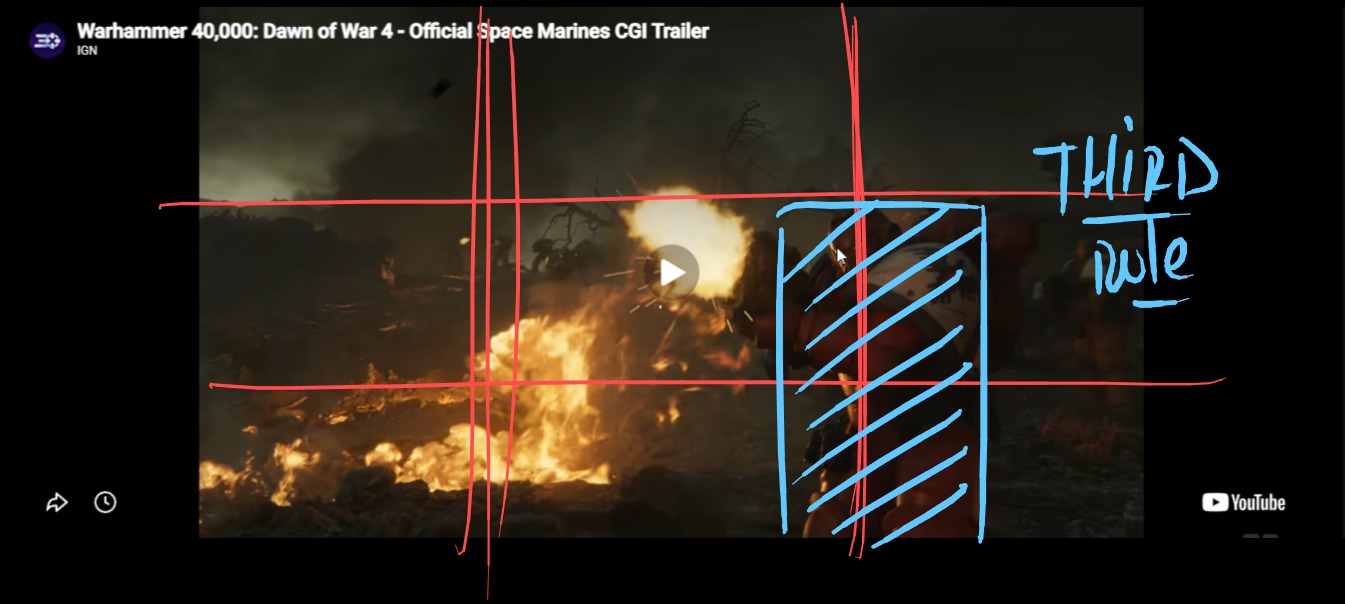
A note belongs
on the frame.
Not somewhere between an email, a timecode and a screenshot called final_final.png.
Your inbox has suffered enough. 🫠
Who it’s for
For everyone
who shows
their work.
If “just a tiny change” has ever ruined your afternoon, pull up a frame. You're among friends.
No account needed to try it.
Animators & motion designers
Draw the fix, don’t describe it.
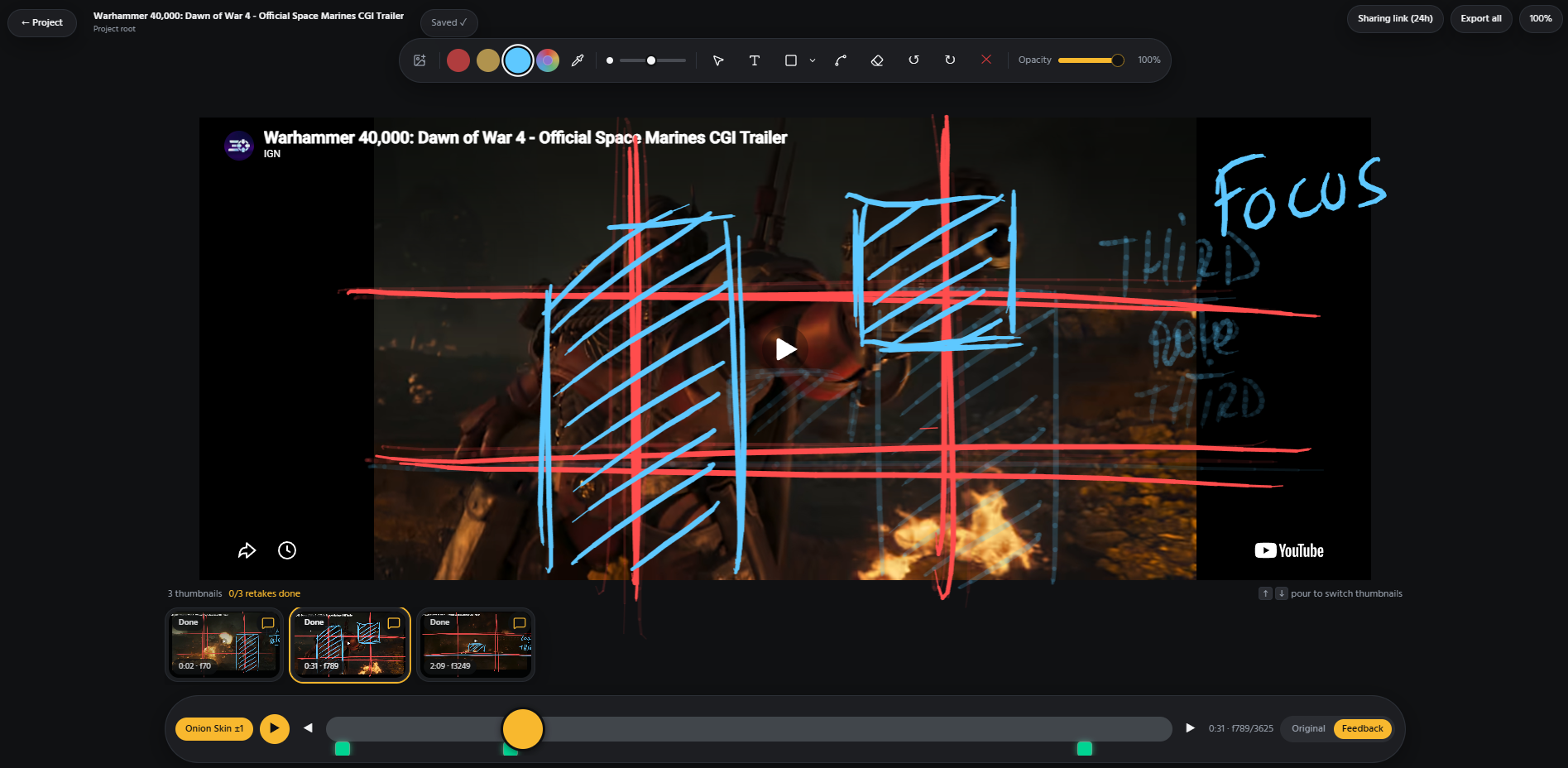
Onion skin, per-frame drawings, motion paths and a timeline added to a still image. GIF, Adobe Animate and Krita files open as playable video.
Studios & production teams
One review instead of four.
Projects, folders, groups and statuses in one workspace. Review live with the team and export the feedback to your own Drive.
Freelancers & illustrators
Clients mark the frame, not the inbox.
Send a link. The client draws on the image and you get a note with the drawing attached, on the exact frame.
Schools, classes & students
Every student gets the same eyes.
Teachers review frame by frame inside the school workspace, students join free and keep their own free space.
3D & game artists
Notes pinned to a camera angle.
Open GLB, GLTF, OBJ or FBX in the browser and leave comments that stay with the angle you saw them from.
Clients, producers & reviewers
No install, no account, no excuse.
Open the link in any browser, draw on the frame, mark each note Done once it is handled. Works on a borrowed laptop.
One studio, every format
Video, image, audio, 3D.
Same studio.
Bring the file you are working on. Leave the feedback where it matters.

Video & YouTube
MP4, MOV, WebM and YouTube links. Draw frame by frame, compare with onion skin and follow the audio waveform.

Animation files
PNG/JPG sequences at your chosen cadence, GIF, Adobe Animate (.fla) and Krita (.kra), converted to playable video in your browser.
Images & pro formats
PNG, JPG, SVG previews, flattened PSD/PSB, Illustrator, EXR, TIFF and Krita. Add a timeline to a still image for drawings and comments on each frame.
Audio
Notes pinned on a detailed waveform that follows playback, with the full track always visible below. “It sounds off” finally has an address.


PDF & web pages
One frame per PDF page. Paste a web, Vimeo, Behance or ArtStation link to annotate its capture.

3D models
GLB, GLTF, OBJ and FBX with notes linked to their camera angle. Export Blender and Toon Boom files to a supported format first.
The tools
Draw it. Track it.
- 01
Draw the correction
Brushes, arrows, shapes and text. Move, mirror or squash & stretch a drawing. The arrow is free to have a character arc.
- 02
Work through the frames
Onion skin, comparison and motion paths. Image timelines, Auto video cadence, or 24, 25, 30 and 60 fps. Precision without timecode gymnastics.
- 03
Keep the explanation with it
Comments on each frame, marked Done individually. Screen and mic clips saved to your connected Drive. A useful note, not a voice memo treasure hunt.
Review together
Live, shared, clear.
Same frame. Same conversation.
In LIVE review, guests follow your playback and drawings. No more 'wait, which bit are you looking at?'
Teams, not access puzzles.
Organize members and guests into groups, with private project and folder access. Invite the right eyes, not the entire internet.
Find the next pass. Not your limits.
Folders, review statuses, online presence and a compact rename / move / download menu. Done stays out of the way until you need it.
Recently, in the studio
Small tweaks.
Unlike yours,
we meant it.
A more precise timeline. Feedback you can take away. Files you can actually find. Less clicking, more fixing.
Where Framink is headingBuilt for the next pass. Yes, there will be one.
- 01
Your timeline. Your tempo.
Auto video cadence, or your choice of 24, 25, 30 or 60 fps. Frame stepping and the counter follow along.
60 fps. Still one very vague client note.
- 02
Still image. Moving feedback.
Give an image its own timeline, with drawings and comments on each frame, playback and onion skin. Saved with the image in your project.
The image stays still. Your ideas don't have to.
- 03
Download the file. And the point.
Download original project files, or export annotated 2D frames as images with drawings and notes on top.
The red circle is coming with you.
- 04
Less folder drama.
Rename and move content from one compact menu. Upload a file with an existing name? A heads-up tells you, and both files are kept.
final_final_v7. We won't judge. Much.
What you get
Less explaining.
More fixing.
When the note sits on the frame, the email thread, the clarification call and the screenshot called final_final_v3 all lose their job.
The note sits on the frame
Draw where the problem is, at the exact second. No timecode gymnastics, no screenshot called final_final_v3.
Nothing to install
The studio runs in the browser. Drop a file, draw, leave. In the quick studio your file never leaves your machine.
Anyone can review
A link is enough. Reviewers need no account, so they answer with a drawing instead of “looks good to me”.
Nothing gets lost
Each comment lives on its frame and is marked Done one by one. The next pass starts where you stopped.
Your files stay yours
Connect Google Drive to the workspace: media and exported feedback land in your own folder, not on our servers.
One price, as many people as needed
Unlimited reviewers and no per-seat pricing. Invite the whole studio, the price does not move.
Go further
A home for the
next version.
Keep your projects, invite the team and come back for the next round. Start with the Free workspace, or take Pro and Team free for your first year.
 Loading…Free to start · Pro and Team free for a year
Connected to Google Drive
Your files stay in your Drive.
Connect Google Drive to the workspace. Media and exported feedback stay together in the project folder.
Workspace plans
Choose your workspace.
Free for trying things out. Pro for ongoing projects. Team for working together. Pro and Team are free for your first year: sign up free, no card.
Unlimited reviewers. No per-seat pricing.
Free
€0
Recommended for most reviews: create a free account and keep your projects for 3 days.
Free account, projects kept for 3 days
- 2 projects at a time
- Unlimited items
- Projects last 3 days (72 h)
- Unlimited reviewers
- Public link or invited emails
- Drive connection
- 500 MB direct storage per workspace
Pro
€0for your first year
then 5 €/month or 54 €/year
For solo artists and freelancers working on long-term projects.
Keep your projects and annotations
- Everything in Free
- Unlimited projects
- Permanent projects
- Annotations kept forever
- Project groups
Team
€0for your first year
then 17 €/month or 174 €/year
For teams that review together every day. Add as many members as you want, you never pay per seat.
One price for the whole team, unlimited members
- Everything in Pro
- Unlimited team members
- No per-seat pricing, one price for the workspace
- Sub-teams
- Shared access per project or group
Education / Studio
Pricing on request. Get in touch directly.
For schools and studios that want Framink under their own brand. Everyone joins free, you never pay per member.
Your studio, your branding, unlimited members
- Everything in Team
- Unlimited members
- Custom branding
- Contact us directly for pricing
The free year counts from your signup date. No card, no automatic charge, one claim per account, on a Free workspace you own. Everything is managed in your workspace's Plan tab.
Use cases
How people use Framink.
Agency Approval Workflow
Agency approvals often cross strategy, design and client review. A visual feedback tool is not a contract system.
Animation School Feedback
An animation critique is easier to follow when it shows the pose and the timing together.
3D Model Review
A model note is much more useful when the reviewer can return to the camera angle that revealed the problem.
Advertising Creative Review
An advertising creative review should make the message, brand and call to action legible without losing the visual idea.
Animatic Review
An animatic adds timing and sound to the board. A panel that reads on paper may disappear too quickly in motion.
Architecture Visual Review
Architectural visuals are reviewed for composition and communication; a browser annotation is not a construction drawing.
Blog
From the studio.
How to Give Feedback Without a Meeting
Write a self-contained visual note that names the location, the observed issue and the outcome you want from the next version.
Best Animation Review Software
Choose animation review software by the shot workflow: frame accuracy, handoff, playback and collaboration matter more than a generic feature list.
Why Creative Teams Have Too Many Meetings
Some meetings exist only because feedback was too vague to implement asynchronously.
Stop Sending Screenshots for Feedback
A screenshot detached from its source quickly loses its version, timing and context.
Why “Move It a Little to the Left” Is Bad Feedback
“A little” has no shared reference point and “it” may mean several objects.
How to Review Creative Work Without Project Management Software
A review is not the same thing as a production plan. You can make a visual correction without assigning tasks across a board.
FAQ
A few practical questions.
Is Framink free?
Yes. The studio is free without an account, and every account starts with a Free workspace.
Are my files uploaded?
Not in the quick studio: files open locally in your browser and are released when you close it. In workspaces you can keep files in your own Google Drive.
Can clients annotate without an account?
Yes, if you allow it on the project. You can also restrict access to specific email addresses or folders.
Which formats are supported?
Videos, YouTube links, GIFs, Adobe Animate (.fla), Krita (.kra), images, Photoshop (.psd/.psb), Illustrator (.ai), EXR, TIFF, audio, PDFs, web pages and 3D models (GLB, GLTF, OBJ, FBX). Blender and Toon Boom files need a quick export first.
Can I draw frame by frame on a still image?
Yes. Add a timeline to an image, choose its frame count, and give each frame its own drawings and comments. Choose 24, 25, 30 or 60 fps and use onion skin to see neighbouring frames. The image stays still; your annotations do the moving. In a project, the timeline and feedback are saved for your next visit.
Can I download files with the feedback?
Yes. Download original project files from their menu. For 2D media with feedback, Download with feedback opens the studio and exports annotated frames as images, with drawings and notes on top. It does not create a new video with feedback burned in.
Can I review live with my team?
Yes. Turn on Live review in the Share window: your studio switches to LIVE mode and guests follow your playback and drawings in real time.
Can I record my explanation?
Yes, with Google Drive connected: record a whole session (up to 5 minutes) or a screen/mic clip per comment. Recordings stay in a dedicated Drive folder.
Will it stop the client from asking for one more version?
No. But every version will come back with drawings on the frame instead of “small tweaks” in an email. Progress, of a kind.